
Bootcamp Instructor Resources
Welcome Bootcamp Instructors!
We are thrilled to have you join us for Bootcamp 2026.
This page will serve as your headquarters for all things related to Bootcamp. Please see the page contents list and Quick Links and Info sections to navigate around the page. The details found on this page, along with additional information can be found in the downloadable PDF “Instructor Resources”, linked below.
Daily Schedule
Monday March 23rd
8:30 am Bootcampers Arrive on Campus for Registration Check In
9:15 am – 12:00 pm Morning Classes
12:00 pm – 1:00 pm Lunch Break
1:00 pm – 4:00 pm Afternoon Classes
Tuesday March 24th
9:00 am – 12:00 pm Morning Classes
12:00 pm – 1:00 pm Lunch Break
1:00 pm – 4:00 pm Afternoon Classes
6:00 pm Industry Night – Optional networking event with industry leaders.
Wednesday March 25th
9:00 am – 12:00 pm Morning Classes
12:00 pm – 1:00 pm Lunch Break
1:00 pm – 4:00 pm Afternoon Classes
6:00 pm PARTY! Pizza, games, and music.
Thursday March 26th
9:00 am Morning Classes
12:00 pm – 1:00 pm Lunch Break
1:00 pm – 4:00 pm Afternoon Classes
4:00 pm Bootcamp Showcase
4:30 pm Bootcamp Ends
Your Access
WIFI
WIFI Network: student_betterPassword: seat belts save lives
Computer Log Ins
Username: bootcampPassword: bootcamp
Washroom Codes
Womens: 3952Mens: 3261
Important Contact Info
Jon Matlock (Bootcamp Overseer)
250.859.1195 | jmatlock@collegeforartsandtech.com
Campus Service Assistants 250.870.2764
First Aid and Muster Points
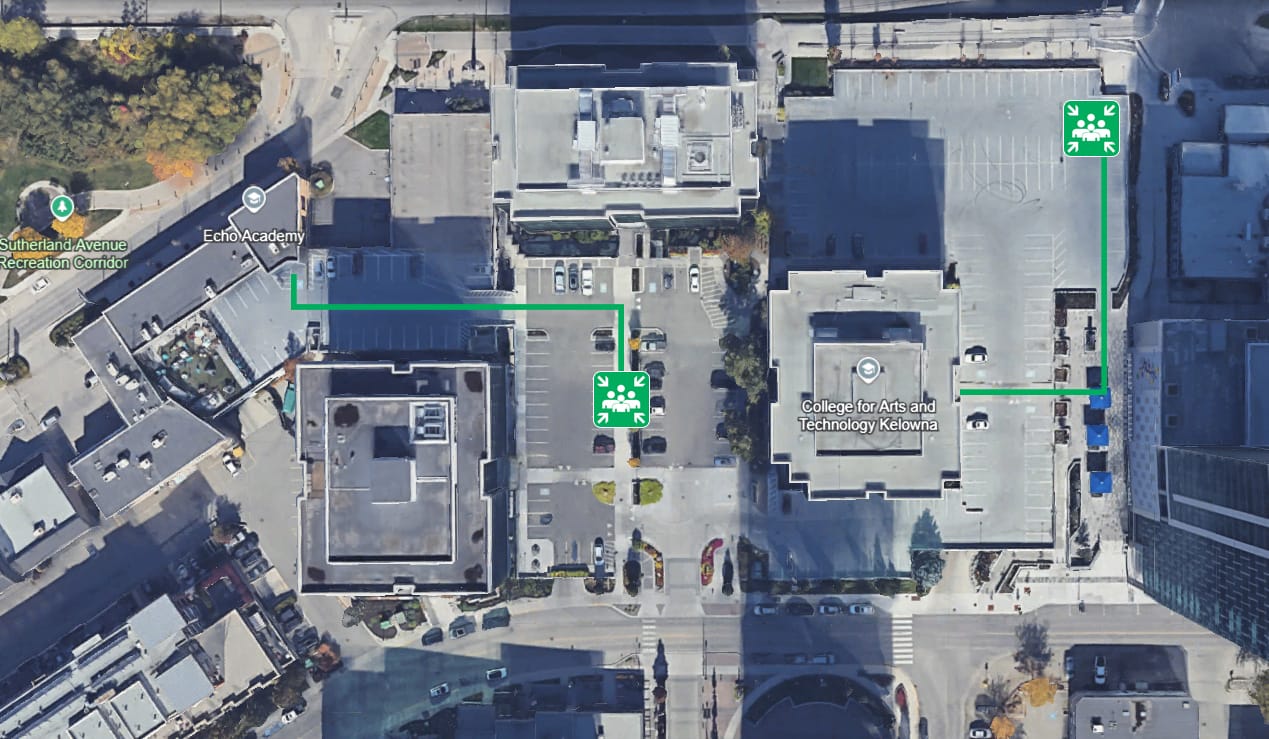
In the case of building evacuation, muster points both campus buildings are shown below.
The Equipment Cage in the main building of campus is equipped with a first aid kit.
Instructor Responsibilities
- Ensure you are following ALL campus safety protocols. These are non-negotiable. These protocols also apply to any guests in your missions (ie. models, makeup artists etc.)
- Ensure all the Bootcampers have a safe, fun and engaging experience at Bootcamp. Take attendance on Monday morning. This will help you to get to know your Bootcamp students’ names.
- Jon will come around and take attendance on Monday afternoon and all subsequent days of the camp.
- Provide event and attendee feedback on our survey, linked from your Instructor Resource webpage. This information is used by our Program Advisors to identify rockstar students and provide conversation content for follow up meetings with them.
- Use the file upload boxes to submit student work created in your mission. Upload boxes can be found at the bottom of this page.
- Immediately inform Jon if a Bootcamper is hurt, ill or needs to leave campus.
- Bootcampers are NOT ALLOWED to leave campus during Bootcamp hours without approval from Jon, or you, the Bootcamp Instructor. If your students wish to leave campus for lunch, they MUST let you know they are leaving, along with where they plan to go.
Room Allocations
- Acting: MS3
- Animation: M104 and B106
- Audio: B104
- Filmmaking: B107, M104, SS1, and Edit Suite
- Interior Design: S201
- Photography: SS1 and B107
Parking
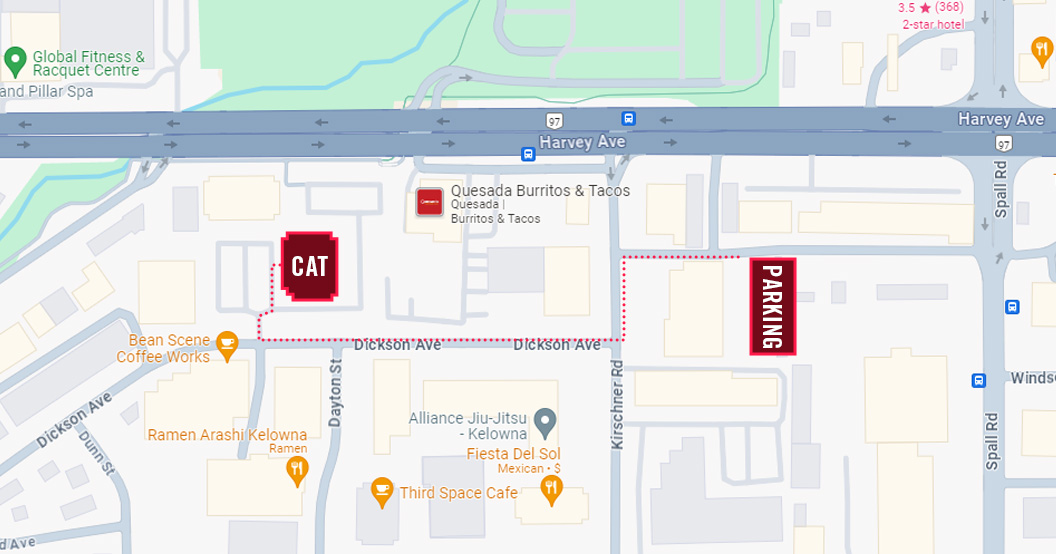
Instructors with either a CAT staff or CAT student parking pass may continue to park where you normally would. If you have any guests coming to your mission classroom, they can park in short-term, visitor spots.
Visitors for must register their license plate with Indigo for free 3-hour parking.
Bootcamp students must park in the CAT student lot and register their license plate with Indigo.
Addressing Questions
Program Questions and Program Advisor Appointments
If you have Bootcamp students who ask you questions about our full-time programs, (tuition, how to apply etc.) it is very important that you direct their inquiries to our Admissions Department.
They can connect with our Program Advisor, Michael Thorpe, by speaking with Nicole, or by booking a meeting.
Instructor Survey Link
We value your feedback! We have prepared a survey for all instructors to be completed after Bootcamp concludes. To make filling out the form as smooth and easy as possible, we recommend visiting this link on a desktop.
Link available soon.
Upload Student Work
Please use the appropriate link (that matches your mission) below to upload files created by your Bootcamp students. Please note, maximum file upload size is 134 MB. For files larger than 134 MB, please use the USB that was provided to you.